

1- Select AR-GUI > Programming Management > UV-C Programming.
2- Set up a connection between your Android device and your UV-C Sterilization robot.
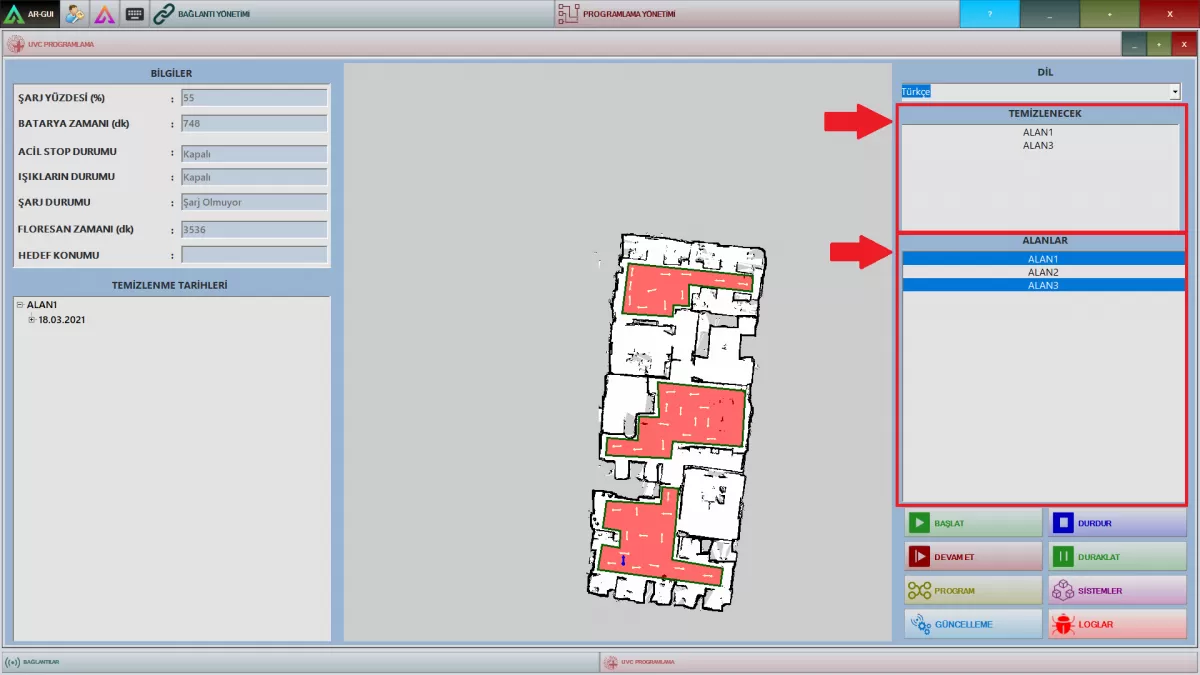
Image G-1: Manual Sterılızatıon Process
Step-1: Select only the fields you want to sterilize from the “Fields” section on the right side of the UV-C interface.
Step-2: Make sure that the fields you have selected appear in the "To be cleaned" section.
Step-3: Start sterilization by clicking the Start button.
Stop: Ends the sterilization process.
Pause: Pauses the sterilization process.
Resume: The sterilization process continues from where it left off.
3- Start the sterilization process.
4- Make sure that the field is empty during the sterilization process.